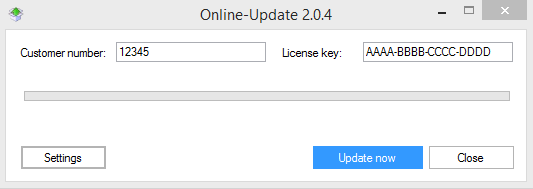
Licensing via online update
Licensing is necessary to enable the functionality of rpDesigner selected for you.
The rpDesigner doesn’t start, if it can’t find a valid license.Since version 1.2.4 there is a special program available to take account of changes in security features of Microsoft Windows. This program is called update.exe and is located in the rpDesigner installation folder.
Start of the licensing process
There are two ways to start the licesing process:
Start licensing within the rpDesigner
Select the menu item ‘Help’ within the rpDesigner and select next ‘Online Update…’. Afterwards you will be pointed out, that the rpDesigner has to be closed to run the licensing process. Possibly you will be asked to save the current task. Now the licensing program will run.
Start licensing via rpDesigner directory
Search with the help of your explorer in the rpDesigner directory for the program update.exe. The rpDesigner directory you will find usually in “C:\programs\Raumplus\”. Run the program with double-click on it.
Execute the licensing
Enter your customer ID and your Licence key in the the check boxes and select afterwards “Update now”.